When buying a hidden camera, focus on five core factors: video resolution, storage method, power source, field of view, and whether the camera needs to connect to Wi-Fi or work independently. Get those five things right for your specific situation, and you’ll have a reliable tool that works when you need it. Get them wrong, and you’ll end up with footage that’s blurry, missing, or inaccessible at the moment it matters most.
I’ve talked to a lot of people who bought the wrong camera — not because they didn’t care, but because they didn’t know what questions to ask. A hidden camera isn’t complicated once you understand what each feature actually does. This post walks you through every factor that matters, in plain terms, so you can buy with confidence and not guess your way through it.
What video resolution do you actually need in a hidden camera?
For most home and office applications, 1080p resolution is the right baseline. It gives you enough detail to clearly identify a face, read a label, or capture something happening across a room. Anything below 720p is a gamble — the footage may technically record the event but lack the clarity to be useful afterward.
4K cameras exist in the hidden camera category, but they come with tradeoffs. Higher resolution means larger file sizes, which fills up storage faster and may require more processing power, which can affect battery life. Unless you’re covering a large area where fine detail at a distance genuinely matters, 1080p is a practical and reliable choice for most people.
Frame rate matters too, though it’s often overlooked. A camera recording at 15 frames per second will produce choppy footage — workable, but not ideal. Thirty frames per second gives you smooth, natural motion that’s far easier to review. If your camera will be monitoring an area with any movement, look for 30fps as a minimum alongside your resolution choice.
How should a hidden camera store its footage — SD card, Wi-Fi, or cloud?
This is one of the most important decisions you’ll make, and the right answer depends on how you intend to use the camera. There are three main options: local storage via SD card, live viewing and recording over Wi-Fi, or cloud-based storage accessed through an app. Each has genuine advantages and real limitations.
A hidden camera with an SD card operates completely independently. No internet connection required, no subscription fees, no third-party server holding your footage. You pull the card and review what was recorded. That simplicity is valuable — particularly in locations where Wi-Fi isn’t available or where you don’t want remote connectivity creating a security vulnerability. The limitation is capacity: a standard card fills up, and once it’s full, older footage gets overwritten unless you check it regularly.
A hidden camera with Wi-Fi lets you check live footage from your phone and often sends motion-triggered alerts. That real-time awareness is genuinely useful if you want to know what’s happening at home while you’re away. The tradeoff is dependency — if your internet goes down, the camera may stop recording or transmitting. Wi-Fi cameras also require a stable network, and setup takes more effort than a standalone SD card unit.
Cloud storage offers convenience but typically requires an ongoing subscription. For some people that’s worth it. For others, paying monthly for footage storage feels unnecessary. Think honestly about how you plan to retrieve and review footage before committing to any storage method.
How long should a hidden camera run on battery — and does it need continuous power?
Power source is the factor that most often catches people off guard. A hidden camera that runs on battery has a hard limit on how long it can record continuously. In most cases, that’s anywhere from two to eight hours depending on the model, resolution, and whether Wi-Fi is active. For short monitoring windows — a few hours while you’re at work, for example — battery power is perfectly adequate.
For continuous or long-term monitoring, a camera with a power cord or USB connection is far more reliable. The challenge is that a power cable has to be managed — run discreetly, plugged into an outlet, and not visible in a way that compromises the camera’s concealment. That’s why so many reliable hidden cameras are built into objects that are already near power sources: clock radios, desk lamps, and smoke detectors.
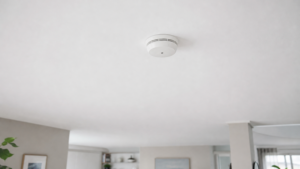
A hidden camera smoke detector is a strong example of smart design. It mounts where a smoke detector normally goes, connects to standard outlet power, and covers a wide area from ceiling height — all while looking exactly like what it’s supposed to look like. If you need something that runs continuously without battery management, that type of form factor is worth looking at seriously.
Motion-activated recording is another way to extend battery life significantly. Rather than recording hours of empty room footage, the camera only records when movement is detected. For most home monitoring situations, this is the smarter approach — you get the footage that matters without burning through storage or battery on nothing.
What field of view should a hidden camera have?
Field of view — the angle of what the camera can see — is measured in degrees. A narrow field of view, around 60 to 70 degrees, works well for monitoring a specific spot like a front door or a desk. A wide-angle lens at 90 to 120 degrees covers significantly more of a room and is better suited to general area monitoring.
The right choice depends entirely on placement. If you’re putting a hidden camera pen on a desk to capture what happens in that immediate area, a narrower field of view is fine. If you’re monitoring an open room from a corner or ceiling position, you want the widest angle available.
Be realistic about what any single camera can cover. A 120-degree lens sounds impressive, but at distance, the edges of the frame can lose detail. For larger spaces, two cameras positioned to overlap coverage are more reliable than one camera trying to cover everything.
Do you need night vision in a hidden camera?
If there’s any chance the area you’re monitoring will go dark — even partially — then yes, you need night vision. The most common technology used is infrared, which illuminates the scene with light the human eye can’t see while the camera captures it clearly in black and white. It works, and it works well in complete darkness.
A hidden camera with night vision is worth having in most home applications because lighting conditions change. A camera that performs well at noon may record nothing useful at 11 PM. If your monitoring need is time-limited to business hours or well-lit areas, you may not need it. But if there’s any uncertainty about when something might happen, night vision removes a significant gap in your coverage.
One thing to know: infrared LEDs on some cameras glow a faint red when active, which is visible in complete darkness if someone knows to look for it. Higher-quality models minimize or eliminate this. If concealment in low-light is a concern, look for cameras marketed specifically as “zero glow” or “invisible IR.”
What placement and form factor considerations actually matter?
A hidden camera only works if it stays hidden. That sounds obvious, but a lot of people underestimate how much placement determines both concealment and effectiveness. The best camera in the wrong location gives you footage of a wall or a ceiling corner with no useful detail.
Think through three things before you buy: where the camera will be placed, what it will be aimed at, and how power will reach it. A camera disguised as a smoke detector is ideal for ceiling mounting with wide area coverage. A camera in a clock or charging station works well on a shelf or nightstand. A pen camera is portable and works in situations where you need something you can bring with you rather than install permanently.
Also consider who might notice it. The purpose of a hidden camera is that it doesn’t attract attention. If the object it’s built into looks out of place in the room, it defeats the purpose. Choose a form factor that fits naturally into the environment you’re monitoring.
If you’re weighing whether to combine visible and concealed cameras, the post on mixing dummy cameras with real cameras is worth a read — it covers the strategic value of visible deterrence alongside covert monitoring.
Frequently Asked Questions About Buying a Hidden Camera
What resolution is good enough for a hidden camera?
1080p is a reliable standard for most home and personal monitoring situations. It provides enough clarity to identify faces and read details without creating file sizes so large they fill storage quickly. 720p can work in smaller spaces with close-range subjects. Anything below 720p tends to produce footage that’s too soft to be genuinely useful when it counts.
Can a hidden camera record without Wi-Fi?
Yes. Hidden cameras with SD card storage record locally and don’t require any internet connection. They store footage directly to the card, which you remove and review manually. This makes them reliable in locations without Wi-Fi and eliminates concerns about network dependency or third-party servers. The tradeoff is that you don’t get live viewing or motion alerts sent to your phone.
How long can a hidden camera record on battery?
Battery life varies significantly by model and settings. Most battery-powered hidden cameras record between two and eight hours on a full charge when recording continuously. Motion-activated recording can extend that considerably by only capturing footage when movement is detected. For situations requiring continuous monitoring over many hours, a camera with a hardwired or USB power connection is the more practical choice.
Where is the best place to put a hidden camera in a home?
The best placement balances coverage with natural concealment. Ceiling-mounted cameras disguised as smoke detectors provide wide-angle views of entire rooms without drawing attention. Shelf-mounted cameras in clocks or charging stations work well for monitoring entry points or specific areas. The goal is a location where the camera’s disguise fits naturally and the lens has a clear, unobstructed view of the area you need to monitor.
Is night vision necessary in a hidden camera?
If there’s any possibility the monitored area will be in low or no light during hours you care about, night vision is a necessary feature. Infrared night vision captures clear footage in complete darkness without emitting visible light. Cameras without night vision simply record darkness — which means missing whatever happens after the lights go out. For home use, night vision is worth having even if you don’t expect to need it.
How do I know if a hidden camera is recording?
Most hidden cameras have a small indicator light that shows recording status, though some can be set to disable that light for full concealment. SD card cameras can be checked by reviewing the card. Wi-Fi cameras typically show recording status through a connected app. Before relying on any camera, test it in the actual placement position and verify footage is being captured correctly — don’t assume it’s working without confirming.
What’s the difference between motion-activated and continuous recording?
Continuous recording captures everything from the moment the camera is on until storage is full or the battery dies. Motion-activated recording only starts when the camera detects movement in the frame. Motion activation conserves battery and storage significantly, and makes reviewing footage faster since you’re only watching moments when something happened. For most home monitoring purposes, motion-activated recording is the more practical setting.
How much should I expect to spend on a quality hidden camera?
A reliable hidden camera typically costs between $40 and $150, depending on features. Basic SD card cameras with solid 1080p resolution fall in the lower range. Wi-Fi-enabled cameras with live viewing, motion alerts, and night vision tend to run higher. Extremely cheap cameras — under $30 — often cut corners on image quality, build reliability, or both. For a more detailed breakdown, the post on how much a good hidden camera costs covers pricing across different feature levels.
Buying a hidden camera is a straightforward decision once you know what you’re actually deciding. Resolution, storage, power, field of view, and night vision — those five things, matched to your specific location and monitoring need, will get you to the right camera without guesswork. You don’t need to be a tech person. You just need to be honest about the situation you’re preparing for.
At Stun Guns, we carry cameras built for everyday situations — homes, small offices, and the spaces where real people need reliable coverage. Browse the options, and if you have questions about which type fits your situation, reach out. I’d rather you get the right camera than any camera.